
Your data stays yours
Deploy with 1Panel or Docker Compose on your own servers. Connection traffic does not go through a third party. Self-hosting is completely free.
Private relay · End-to-end encryption
Put remote desktop inside your own network domain. Prefer direct P2P, fall back to a private relay — screens and files stay between your devices.
Windows 10+ · macOS 12+ · Linux · Android · Web controller
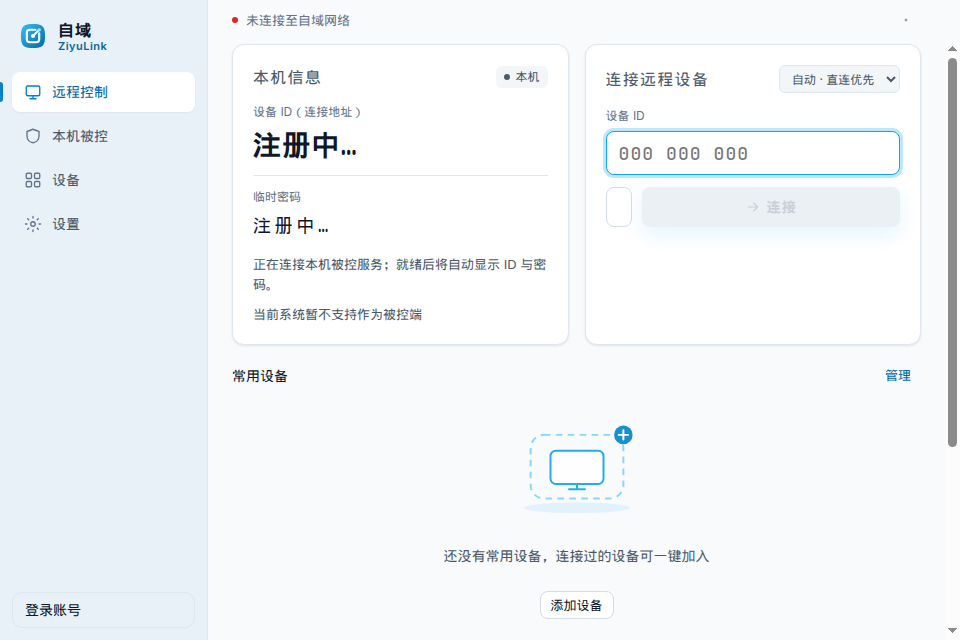
A self-hosted remote control product for individuals and teams — keep sessions on your network.
Deploy with 1Panel or Docker Compose on your own servers. Connection traffic does not go through a third party. Self-hosting is completely free.
DTLS end-to-end encryption, SPAKE2 password handshake (password never sent in cleartext), certificate pinning, and optional TOTP.
Devices and online status at a glance; orgs, departments, and roles; policy push (e.g. block file transfer, view-only); audit export; session recordings can upload to your server.
Windows, macOS, and Linux desktop are the primary clients (control and host). Android and browser (including iPhone) are also available. Windows install needs no admin; silent bulk deploy is supported.
Sharp low-latency video with hardware H.265 when available. If P2P hole-punching fails, the session switches to relay automatically. Terminal, port tunnels, file transfer, Wake-on-LAN, and unattended access live in one client.
Screen, collaboration, ops, and compliance in one desktop-first client.
Run the stack in your datacenter, or use the official service.
1Panel one-click or Docker Compose; data stays on your network; ship preset installers to employees with silent deploy; includes admin console, policies, and audit logs.
Read deploy docsSoftware free, P2P free; only official relay is metered; new users get a trial allowance; buy traffic packs when you need more (coming soon).
Download desktopOnly verifiable differences — for selection, not marketing fluff.
| ZiyuLink | Sunlogin | ToDesk | RustDesk | |
|---|---|---|---|---|
| Self-hosted server | Yes (1Panel / Docker Compose, self-host free) | Primarily official cloud | Primarily official cloud | Open-source self-host supported |
| Pricing model | Software free; P2P free; official relay by traffic | Free tier + paid plans (see vendor) | Free tier + business plans (see vendor) | Client OSS free; optional paid official cloud |
| Platforms | Windows / macOS / Linux desktop first; Android & browser | Windows / macOS / Linux / Android / iOS, etc. | Windows / macOS / Linux / Android / iOS, etc. | Windows / macOS / Linux / Android / iOS / Web, etc. |
| Enterprise admin | Self-host includes orgs / roles / policies / audit (no billing ops) | Enterprise features per vendor docs | Enterprise features per vendor docs | Self-host extensible; commercial edition per vendor docs |
Information as of October 2026; always verify against each vendor’s official docs.
Deploy, billing, security, and platform limits.
Yes. Deploy on your own servers and use it at no charge.
No. In self-hosted mode, signaling and relay stay on your infrastructure.
Sessions use DTLS end-to-end encryption. Password auth uses SPAKE2 so the password itself is not sent on the wire. Certificate pinning and TOTP are also supported.
Software free, P2P free. Only official relay traffic is billed. New users get a trial allowance; buy packs when it runs out (coming soon).
The client shows the current connection type and relay usage (as billing rolls out).
Endpoints prefer P2P. If hole-punching fails, the session switches to relay automatically. Self-hosted users relay through their own servers.
Installers are not code-signed yet, so Windows SmartScreen, antivirus, or macOS Gatekeeper may warn or block them. That is common for unsigned builds and does not by itself prove tampering. Download only from this site or the official releases repo, and verify the SHA256 shown on the Download page. Windows: SmartScreen → More info → Run anyway; add the install folder to your AV allowlist. macOS: System Settings → Privacy & Security → Open Anyway, or Control-click the app → Open. Verify with certutil -hashfile <file> SHA256 on Windows, or shasum -a 256 <file> on macOS/Linux. If the hash matches but vendors still flag it, report via the releases repo Issues so we can pursue allowlisting. We do not claim the software is “absolutely safe”; trust official channels plus checksums.
Desktop-first: Windows, macOS, Linux (AppImage and deb — whatever the releases repo actually ships; no rpm today). Android and browser are secondary. Some features are unavailable on the macOS login screen and on Linux Wayland; use an X11 session on Linux if needed.
Any Linux host that can run Docker. 1Panel one-click install is recommended.
Not at this time. Teams with audit needs can self-host and use audit logs plus session recordings for internal controls.
Yes. Ship installers with a preset server address; silent install is supported. Windows install does not require admin.
Public beta. We iterate quickly from community feedback — GitHub issues and the community group are welcome.
Deploy in minutes, use it free. Join the public beta and help us polish it.